Developer Guide
Table of contents
Pre-requisite
Our command-line tool uses on Docker as a backend to install all the dependency. So, please be sure to install Docker before you run it.
Tools for Static Analysis
CMIND uses some tools for static analysis. You will not need to install these tools yourself as it has already configured in the docker file.
Joern: We use Joern for data flow analysis and methods extractions.
Doxygen: We use Doxygen to generate the callgraph.
LLM Agents
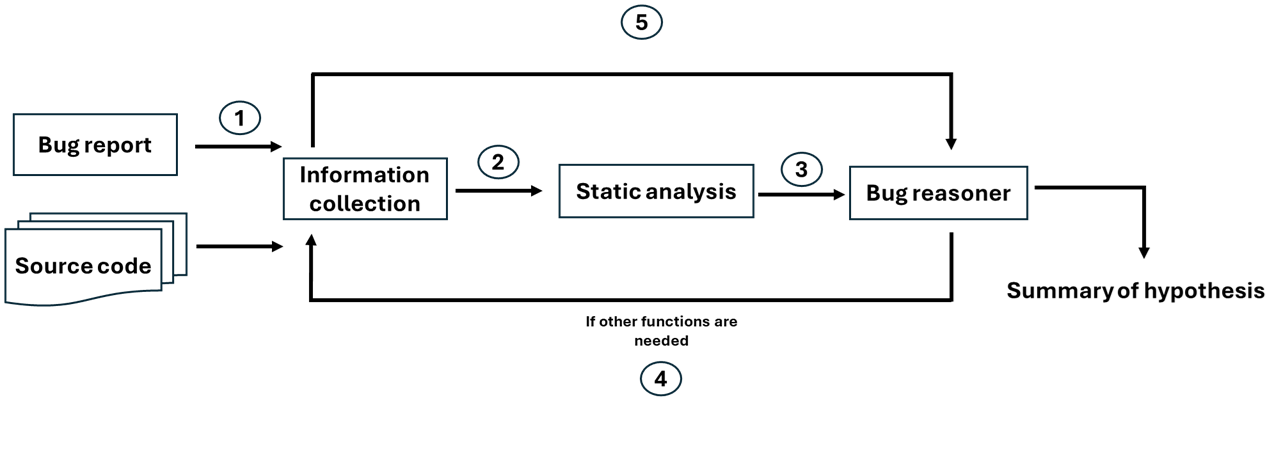
Due to the limit of the input size in LLMs, we cannot keep using one LLM for the entire task. To this end, we seperate our LLMs agents into three differnt categories:
- Information collector: Collect the entry point and the related functions from the bug report
- Static analysis: Decide whether to use static analysis or callgraph analysis
- Bug reasoning: Reason the localization of the bugs and summarize the bug reasoning
Workflow
Configurations
Please create the JSON file with the following format to set up your configuration. Note that we do not upload this file for the security reason. For password, you will need to generate the APP password instead of the password for your email.
{
    "doxyfile_dir": "Path of Doxyfile for generating callgraph",
    "model_name": "GPT models tag",
    "joern_dir": "Joern directory e.g. '/opt/joern/joern-cli/joern'. Note that it needs to be the directory in the docker container not local directory"
    "_joern_dir": "Joern directory for tesing locally e.g. '/home/chiayi/bin/joern/joern-cli/joern' You will need to change it to joern_dir yourself when run it locally for debug",
    "openai_key": "Path for your OpenAI key",
    "project_dir": "Dirctory of your source code",
    "report_file": "Directory for your bug report e.g. './bug_report.txt'",
    "container_name": "The name of your docker container e.g. debugger_container"
}
- We used
o4-mini-2025-04-16andgpt-5-mini-2025-08-07for the experiments although you could try different cheaper/better models. Please refer to OpenAI for more information.
There are some string parsing might fail when you change to different models because different models could have output with different formats. Be sure to check this, when you use different models.
How to run the code
To run the application, you can simply run the following command.
python3 run.py --config-file=config.json
--config-file: Path of your config.json file
- You will see the results on your screen when it finished. It might take a while because tools for static analysis is slow.